Outdoor Waterproof Smartwatch: Calls, Health & Rain Ready
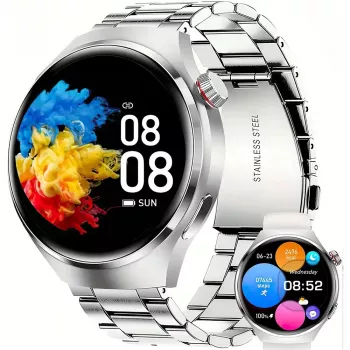
Outdoor Waterproof Smartwatch with Bluetooth Calling & Health Tracking: Built for Days That Don’t Stay Indoors
An outdoor-ready smartwatch should handle weather surprises, busy schedules, and fitness goals without adding friction. Our team put together this guide to show you how an outdoor waterproof smartwatch with Bluetooth calling and health tracking can fit into everyday life—commutes, workouts, and weekends outside—plus what to look for when you’re pairing it to your phone and building simple routines that last. For more guidance, see Smartwatches with Health and Fitness Tracking – Garmin.
What this smartwatch is made to do (at a glance)
- Keep calls moving when your phone isn’t convenient: answer and place Bluetooth calls from your wrist when connected to your smartphone.
- Support consistent wellness habits: keep daily health metrics and activity tracking in one place so you can spot patterns over time.
- Handle real life outside: a waterproof build designed to stay on through rain, splashes, and sweat (waterproof ratings vary; use common-sense limits around heat and pressure).
- Act as an all-day helper: time, notifications, and quick check-ins without constantly pulling out your phone.
Quick feature map: matching features to everyday moments
| Need | How Bluetooth calling helps | How health tracking helps | Where waterproofing matters |
|---|---|---|---|
| Hands full (shopping, dog walk, chores) | Take/decline calls without reaching for your phone | Steps and activity keep logging in the background | Rain or splashes won’t stop wear |
| Workout session | Stay reachable for urgent calls while moving | Track activity and key signals across the day | Sweat resistance and a quick rinse after training |
| Outdoor weekend (hike, yardwork, travel) | Call back quickly without digging for your phone | Keep your daily movement goals consistent | Unexpected weather, wet hands, and muddy clean-up |
| Commute and errands | Short calls on the go when safe and appropriate | Maintain baseline daily activity tracking | Light rain, handwashing, spills |
Bluetooth calling: what to expect day to day
- Your phone is still the “engine”: Bluetooth calling typically works with your watch paired to a compatible smartphone and kept within normal Bluetooth range. If your phone is on the other side of the house (or in your car), call reliability usually drops.
- Best for quick, practical conversations: wrist calling shines when you’re coordinating pickups, confirming details, or answering a time-sensitive call without stopping what you’re doing.
- Small habits improve reliability: keep Bluetooth on, allow call/contacts permissions (as prompted by your phone/app), and keep your phone nearby during calls.
- Notification control matters: decide which apps can alert your wrist so your watch helps you focus instead of interrupting you all day.
If you want a simple reference for what Bluetooth is designed to do and how connections work, you can review the basics from Bluetooth SIG. For further reading, see Best Smartwatches and Fitness Trackers of 2026 – Consumer Reports.
Health and activity tracking: building a routine that sticks
- Use daily tracking as a baseline: the real value is in trends—how your movement and health signals look over weeks—not a single reading on a stressful day.
- Pair tracking with one simple goal: a daily step target, a movement break every afternoon, or a short walk after meals is often enough to create momentum.
- Check in without spiraling into constant checking: pick set moments (morning, lunch, evening) to review summaries rather than refreshing throughout the day.
- Keep expectations realistic: consumer wearables support general wellness tracking and are not a replacement for medical devices or professional advice.
If you’re building a general activity habit, the CDC’s Physical Activity Basics is a helpful grounding point. For heart-rate context during exercise, the American Heart Association offers accessible guidance on target ranges.
Waterproof for the outdoors: smart ways to use it around water
- Waterproof doesn’t mean “every water situation”: avoid hot showers, saunas/steam rooms, high-pressure water, and chemical exposure unless a device specifically supports it.
- Rinse and dry after sweat, salt, or dirty water: a quick clean helps maintain comfort and keeps the watch looking better over time.
- Strap comfort counts outdoors: for all-day wear, loosening the strap slightly during high heat or intense activity can reduce irritation.
- Be cautious with buttons: if your watch has physical buttons, don’t press them underwater unless the manufacturer indicates it’s safe.
Setup checklist: from unboxing to daily use
- Charge fully before first use: starting at 100% helps with stable pairing and any initial syncing.
- Pair via Bluetooth: connect the watch to your smartphone, then grant permissions needed for calls, notifications, and health tracking (exact steps vary by phone model).
- Choose notification priorities: many people do best with calls and calendar alerts first, then only a few essential apps after that.
- Create a simple daily flow: morning glance for the day’s plan, a midday activity check, and an evening review of steps and key metrics.
- Keep updates current: firmware/app updates often improve connectivity and stability.
Who this smartwatch suits best
In-stock picks from our store
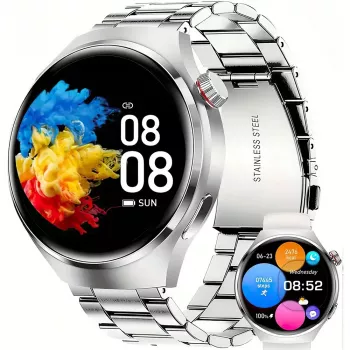
- Outdoor Waterproof Smartwatch with Bluetooth Calling & Health Tracking
- 3D Puzzle Scout Beetle (a hands-on gift option for downtime between outdoor days)
- 1/6 Ophelia BJD Doll (a collectible-style gift for hobby-focused recipients)
FAQ
Does Bluetooth calling work without a phone nearby?
Typically, no. Bluetooth calling generally requires your watch to be connected to your smartphone and within Bluetooth range, so it’s different from an independent cellular watch.
Can a waterproof smartwatch be worn in the shower or for swimming?
It depends on the specific water-resistance rating and design. In general, avoid hot water, steam, high pressure, and chemicals unless the device is explicitly designed for those conditions.
How accurate is health tracking on a smartwatch?
It’s usually most useful for observing trends and supporting general wellness habits rather than treating individual readings as precise measurements. Accuracy can vary based on fit, movement, skin conditions, and the type of activity you’re doing.








Leave a comment