Wireless Ergonomic Gaming Mouse: 8K, DPI and RGB
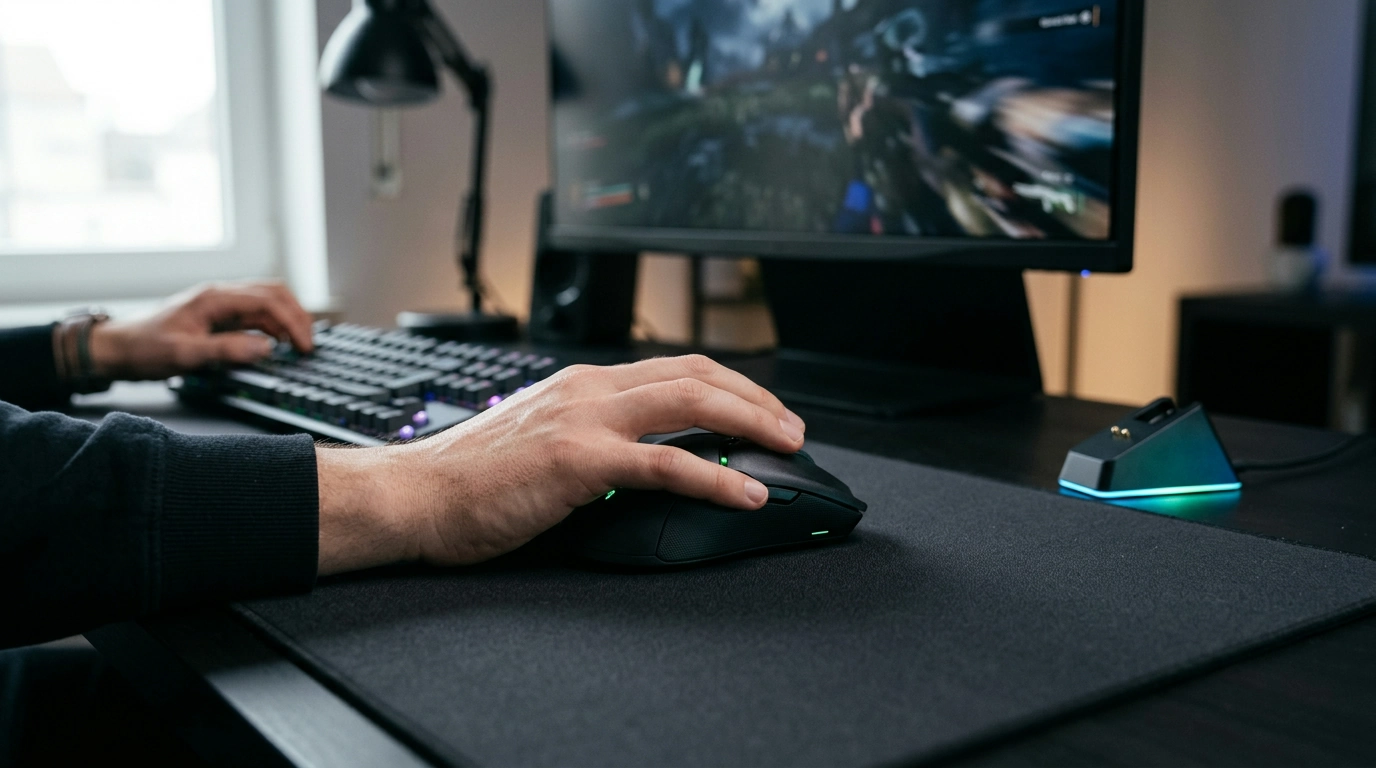
A responsive gaming setup starts with controls that feel right in your hand. Our wireless ergonomic gaming mouse brings together 8K polling, a 26,000 DPI sensor, and an RGB dock, giving you several features to consider as you build a space for play.
The numbers are useful starting points, but they do not tell the whole story. Your preferred games, available desk space, and grip all influence how a mouse feels during a session. Here is how to weigh those details before you choose.
A closer look at the essentials
We offer the wireless ergonomic gaming mouse with 8K polling and RGB dock for players who want a cable-free mouse with a shaped design and lighting for their setup. Its listed polling rate and sensor sensitivity give you performance figures to compare, while the dock adds an RGB element to your desk.
| Feature | What to consider |
|---|---|
| Wireless design | A cable-free connection helps keep the desktop clear. |
| 8K polling | A high polling rate allows for frequent position updates; results depend on the setup. |
| 26,000 DPI sensor | DPI describes pointer sensitivity, so choose a setting that suits your play style. |
| Ergonomic design | Shape and hand fit matter when choosing a comfortable mouse. |
| RGB dock | The dock adds RGB lighting to the setup. |
Together, these features address different parts of the experience. Polling rate concerns how often the mouse reports movement, DPI concerns sensitivity, and the shape affects how your hand rests on the mouse. The dock contributes to the look of your setup rather than determining how accurately you play.
Make sense of polling rate and DPI
Polling rate describes how frequently a mouse reports its position to the computer. An 8K rate means up to 8,000 reports per second. More frequent reports can reduce the time between updates, but the practical difference depends on the rest of your setup and may not be equally noticeable to every player.
DPI, or dots per inch, is a measure of mouse sensitivity. At a higher DPI, a given physical movement generally moves the pointer farther. A lower setting generally requires more mouse travel to cover the same distance, although software and game settings can also affect the result.
Neither number is a shortcut to better aim. If you play games that reward careful targeting and have plenty of desk space, you may prefer a sensitivity that allows broader movements. If your space is limited, a higher sensitivity may make it easier to move the pointer across the screen without lifting the mouse as often.
Start with a setting that feels manageable, then make small adjustments as you play. Pay attention to whether you can turn or navigate comfortably while still making the precise movements your favorite games require. The best setting is the one that gives you the control you want, not necessarily the highest number available.
Fit the mouse to your setup
An ergonomic shape is worth considering if you want a mouse designed with hand position in mind. Comfort is personal, though: a shape that suits one player may not feel the same to someone with a different hand size or grip preference. Consider whether you usually rest your palm on the mouse or guide it mostly with your fingers, and look for a shape that works with that habit.
Desk position matters too. Keep the mouse within easy reach and leave enough clear space for the movements you prefer. The Occupational Safety and Health Administration’s mouse guidance discusses positioning a mouse close to the keyboard and maintaining a comfortable, neutral wrist posture.
The wireless design helps reduce cable clutter around your playing area, while the RGB dock adds a lighting accent. Think about where you want the dock to sit alongside your monitor, keyboard, and other accessories. A tidy arrangement can make it easier to keep your mouse area open, whether you favor wide movements or a compact setup.
For a different kind of desk activity between gaming sessions, our 3D Puzzle Scout Beetle offers a hands-on project to explore away from the screen.
Explore the gaming mouse
Our team has listed the wireless ergonomic gaming mouse at $60.01, and it is currently in stock. Price and availability may change, so visit the product page for current details before you order.
As you compare your options, focus on the features that matter in your own routine: the space you have for mouse movement, the control your games demand, and the shape you prefer under your hand. The listed 8K polling, 26,000 DPI sensor, wireless design, and RGB dock give you a useful set of features to weigh together.
FAQ
What does 8K polling mean for a gaming mouse?
8K polling means the mouse can report its position up to 8,000 times per second. The practical benefit depends on the rest of your setup.
Does a 26,000 DPI sensor mean I should use the highest sensitivity?
No. Sensitivity is a personal choice, and a higher DPI is not automatically more accurate or comfortable.
Who is an ergonomic gaming mouse suitable for?
It can appeal to players who value a shaped mouse, but comfort depends on your hand size and grip preference.









Leave a comment