130000RPM Handheld Air Duster for PC, Car & Home
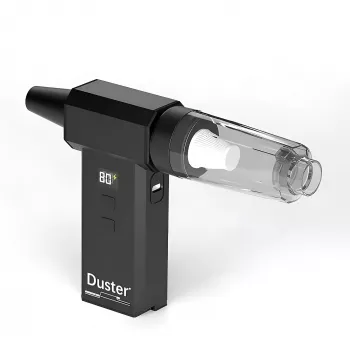
Meet the 130000RPM Handheld Air Duster: Fast, Targeted Cleaning Without Disposable Cans
A high-speed handheld air duster is a reusable way to blow dust and debris out of tight spaces without buying disposable cans. This 130000RPM turbo blower is designed for detailed cleaning around electronics, car interiors, and everyday home messes—while staying compact enough to keep in a drawer, glove box, or tool kit. If you handle routine maintenance (PC filters, console vents, dashboard seams, window tracks), a rechargeable blower can turn a “big cleanup” into a quick habit.
What it is and what it’s built to do
A handheld electric turbo blower generates a focused stream of air for dust removal and quick drying tasks. Instead of relying on single-use compressed air cans, you recharge the device and use it whenever needed.
- Designed for precision cleaning in crevices: keyboard gaps, PC vents, fan grills, dashboard seams, and window tracks.
- Reusable alternative to canned air for routine maintenance and quick cleanups.
- Best for dry debris like dust, crumbs, hair, and lint.
- Not a substitute for vacuuming heavy grit or handling wet spills.
If you’re shopping for a compact option, see the 130000RPM High-Speed Handheld Air Duster & Turbo Blower for PC, Car & Home.
Typical uses around PC, car, and home
PCs, laptops, and electronics
- Clear dust from PC case filters, heatsink fins, fan grills, and power supply vents (with the unit powered off and unplugged).
- Blow out routers, game consoles, and keyboard rows where a vacuum nozzle can’t reach.
- Help maintain airflow, which can reduce thermal throttling and fan noise over time.
Car interior detailing
- Blow debris out of seat rails, cup holder seams, vents, center console edges, and between trim pieces before wiping.
- Push loose dust outward from cracks so vacuuming is faster and requires less scrubbing.
Everyday home cleanup
- Clean window tracks, door thresholds, baseboards, radiator fins, and small appliance vents.
- Tidy up craft rooms and workbenches where fine dust collects in corners and tool creases.
Quick drying and light airflow tasks
- Help remove water from hard-to-reach areas after detailing (use a safe distance and avoid forcing water deeper into electronics).
- Some nozzles may support light-duty airflow tasks for small items, depending on included attachments.
Key strengths to look for in a high-speed handheld duster
- High rotational speed for stronger airflow that can lift embedded dust from vents and fins.
- Comfortable grip and balance for controlled bursts around fragile parts like fan shrouds, switches, and trim panels.
- Multiple nozzles/attachments to narrow the stream for crevices or widen it for broader surfaces.
- Rechargeable power for portability and consistent output compared with disposable cans that weaken as they cool.
- Easy intake maintenance so airflow stays strong over time.
Setup and safe use (especially for electronics)
Used correctly, a turbo blower is a practical maintenance tool. Used carelessly, any high-velocity air stream can drive dust deeper or overspin fans.
- Power down and unplug electronics before cleaning, and let hot components cool.
- Hold fan blades still with a non-conductive tool when blowing into PC or console fans to reduce overspinning.
- Use short bursts rather than continuous blasting to avoid redistributing dust deeper into the device.
- Start at a modest distance; move closer only as needed. Avoid aiming directly at delicate connectors, jumpers, or loose cables.
- Pair with a soft brush or microfiber cloth: blow dust loose, then wipe surfaces to prevent resettling.
For general safety context around air used for cleaning, review guidance from OSHA on using compressed air for cleaning. For broader safety reminders about powered devices and ventilation, see the U.S. Consumer Product Safety Commission.
Performance and task fit at a glance
Small technique changes can make cleanup faster and less messy. Match the nozzle shape to the job, and plan where the dust will land before you pull the trigger.
| Task | Recommended nozzle/approach | Tips to avoid mess |
|---|---|---|
| Keyboard and laptop vents | Narrow stream; short bursts | Tilt the device so dust falls out; wipe after blowing |
| Desktop PC case and filters | Medium/narrow stream; hold fans still | Blow from inside to outside when possible; clean filters separately |
| Car vents and dashboard seams | Narrow stream along seams | Use a detailing brush to loosen debris; vacuum after |
| Window tracks and sliding door rails | Narrow stream aimed along the channel | Blow debris to one end; scoop/vacuum the pile |
| Small appliance grills (fans, air intakes) | Medium stream at a slight angle | Keep distance; finish with microfiber to prevent resettling |
Two quick routines that work well
Care, storage, and keeping airflow strong
Canned air vs. a rechargeable turbo blower
When this tool is the right choice
Recommended picks (in stock)
- 130000RPM High-Speed Handheld Air Duster & Turbo Blower for PC, Car & Home — a compact, reusable option for vents, keyboards, car seams, and quick dry-offs.
- 100W Foldable Solar Panel for Portable Power Stations — a handy add-on for travel, garages, or RV setups where you want flexible charging support for small electronics and power stations.
FAQ
Is it safe to use a high-speed air duster on a PC?
Yes—when the PC is powered off and unplugged. Use short bursts, start from a small distance, and keep fans from free-spinning by holding the blades still.
Can it replace canned air for keyboard and console cleaning?
For routine dust and crumbs, a rechargeable blower can replace disposable cans. Pairing it with a soft brush and microfiber cloth helps keep loosened dust from resettling.
How often should PC dust be cleaned out?
It depends on pets, filters, and room dust, but many setups benefit from checking filters monthly and doing a deeper clean every few months. If fans get louder or temperatures creep up, it’s usually time to clean.







Leave a comment